TechVailTechVail
  • Business
  • Computers
  • Cryptocurrency
  • Education
  • Gaming
  • News
  • Sports
  • Technology
  • Automotive
  • Books
  • Lifestyle
Reading: Automatic Translation in Facebook Messenger
Share
Aa
TechVailTechVail
Aa
  • Business
  • Computers
  • Cryptocurrency
  • Education
  • Gaming
  • News
  • Sports
  • Technology
  • Automotive
  • Books
  • Lifestyle
Search
  • Business
  • Computers
  • Cryptocurrency
  • Education
  • Gaming
  • News
  • Sports
  • Technology
  • Automotive
  • Books
  • Lifestyle
© 2022 Foxiz News Network. Ruby Design Company. All Rights Reserved.
TechVail > Blog > How To > Automatic Translation in Facebook Messenger
How To

Automatic Translation in Facebook Messenger

Lucija Petric
Lucija Petric
Share
automatic translation facebook messenger
SHARE

Facebook Messenger helps people talk to each other from different countries. But sometimes, people speak different languages and can’t understand each other.

That’s where automatic translation in Facebook Messenger comes in. It helps translate messages so that people can talk even if they don’t speak the same language.

In this article, we will learn more about automatic translation in Facebook Messenger and how it helps us communicate better.

What is Automatic Translation?

Automatic translation is when a computer helps translate words from one language to another. It’s like having a special helper who can understand different languages and tell you what someone is saying.

Why is Automatic Translation Important?

Automatic translation is important because it helps us talk to people who speak different languages. It makes it easier for us to understand each other and have conversations, even if we don’t know the same language.

How Facebook Messenger Translates Messages

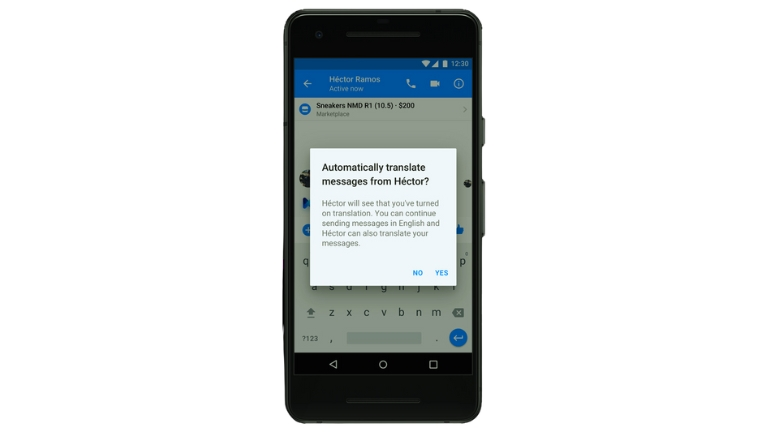
When you send a message on Facebook Messenger, the app can automatically translate it into the language the other person understands. It uses special technology to figure out what the words mean and how to say them in a different language.

Benefits of Automatic Translation in Facebook Messenger

Helping People Understand Each Other

Automatic translation helps people understand each other better. Even if you speak a different language, you can still have a conversation and share your thoughts and feelings.

Making New Friends

With automatic translation, you can make friends from different countries. You can talk to them and learn about their lives and cultures. It’s like traveling and meeting new people without leaving your home.

Learning About Different Cultures

Automatic translation allows you to learn about different cultures and traditions. You can ask questions and get answers from people who live in other parts of the world. It’s like having a window to the world.

Challenges of Automatic Translation

Automatic translation is not perfect. Sometimes, it may make mistakes or not understand the meaning of certain words or phrases. It’s important to be patient and try to understand the general idea of the message.

Keeping Messages Private and Secure

Facebook Messenger takes privacy and security seriously. Your messages are kept private, and the automatic translation process does not store your conversations for a long time. You can feel safe while using this feature.

What the Future Holds for Automatic Translation

In the future, automatic translation will continue to improve. It will become even better at understanding languages and translating accurately. This means that communication between people who speak different languages will become easier and more natural.

Conclusion

Automatic translation in Facebook Messenger is a helpful feature that allows us to communicate with people who speak different languages. It helps us understand each other, make new friends, and learn about different cultures. As technology advances, automatic translation will only get better, making the world a more connected and inclusive place.


Lucija Petric June 23, 2023
Share this Article
Facebook Twitter Whatsapp Whatsapp Telegram Copy Link Print
By Lucija Petric
I used to write about games but now work on web development topics at WebFactory Ltd. I've studied e-commerce and internet advertising, and I'm skilled in WordPress and social media. I like design, marketing, and economics. Even though I've changed my job focus, I still play games for fun.

Latest Posts

Syndicate X Library teaching self leadership through mental discipline and perspective hacking
Unearthing the Self-Leader Hidden Behind Your Autopilot
Lifestyle
singer Tori Kelly reflecting on digital detox presence and motherhood through John Mark Comer's book
Unearthing Peace: Tori Kelly’s Ruthless Elimination Story
Lifestyle
comedian Mike Drucker reflecting on identity and societal expectations through Sayaka Murata's novel
Unearthing Identity: Mike Drucker and Convenience Store
Books
Chris Collins teaching the I AM leadership philosophy inside Syndicate X Library video course
Unearthing the Conviction Every Strong Leader Needs Now
Books
I'm With the Band by Pamela Des Barres discussed by Margaret Cho on Books That Changed My Life
Unearthing Rock Culture: Margaret Cho Through Pamela Barres
Books
comedian Margaret Cho reflecting on raw honesty passion and fearless performance through Pamela Des Barres' memoir
Unapologetically Loud: Margaret Cho on I’m With the Band
Books
actress Susan Lucci reflecting on grief gratitude and resilience after losing her husband Helmut
Recovering From Grief: Susan Lucci’s Find Your Glow Story
Books
Flynt Management Group Chairwoman Liz Flynt reflecting on leadership resilience and legacy through Eleanor Roosevelt's memoir
Eleanor Roosevelt’s Memoir Leaves Liz Flynt Inspired
Books

You Might also Like

How To

How to Add a Microsoft Account to iPhone for Reminders App

5 Min Read
cyberpunk featured
How To

How to Fix Performance Issues in Cyberpunk: Quick Tips

10 Min Read
We’re Unable to Create Your Walmart+ Membership? Here’s How to Fix It
How To

We’re Unable to Create Your Walmart+ Membership? Here’s How to Fix It

6 Min Read
bluesky featured
How To

How to Post GIFs on Bluesky​ (Phone and PC)

10 Min Read

© Copyright 2022 Techvail.com. All Rights Reserved

  • About
  • Contact
  • Terms and Conditions
  • Privacy Policy
  • Write for us
Welcome Back!

Sign in to your account

Lost your password?